Showing posts with label iPad. Show all posts

Wednesday, July 1, 2015

The Best (FUN) Math Apps for Summertime Review (elementary age kids)


Part of summer school this year is extra practice on the iPads.  I appreciate educational games because they can help reinforce the work we do during our lessons, and they offer the kids extra practice without feeling like "school."    

The kids and I have been having a lot of fun getting to know some new apps this summer. We're primarily focusing on math and reading practice.  (Not entirely, but primarily :) )  And man, do my kids need the extra practice.  But because it's the summer, I really tried to track down educational apps that were more game-y and less drill-y.  (And by game-y I do not mean having the strong flavor or smell of game meat, especially when it is slightly tainted.  I mean fun-ish or full on FUN.)  

I personally play all the games I tell you about so I promise I'm not just pulling stuff out of thin air and "recommending" it.  (I've bought plenty of apps that I would never recommend. Booooo. I hate when that happens.)  I also watch my kids play to see if the difficulty level is appropriate for their age/abilities, and to see if they like it.  The games I recommend here the one we really, really enjoy!  You have my word ;)  

So since Math skills are one of those things no one wants to see fizzle out over the summer, here are my top six recommendations for math games that are guaranteed to provide solid practice and serious fun all summer long (or at least on rainy days and Mondays...)


Mystery Math Town ($2.99, Artgig Studios) (note: if you're considering buying any of the Artgig Studio apps, see my note on bundle pricing below)

I am so very excited to recommend this app to you!  THIS app was a home run, a grand slam, a loaded nachos with extra cheese and guacamole purchase.  My boys love it.  As do I.  Players make their way through the town, exploring the various homes and buildings by collecting numbers and using them to solve math problems.  Solving an equation will get you through a door, window, or up/down ladders and stairs as you attempt different challenges, like rescuing missing fireflies and collecting gold coins.  One of the things that makes this app different from many other math practice games is that the player is given the equation "answer" and must build the rest of the equation using the numbers from his "bank."  Example...


___   x  ___ = 21

Choose from -- 8   4   9   3   1   7

If the player doesn't have the numbers needed to complete the equation, he must choose a different door, staircase, etc... to continue collecting what he needs.

All I can say is, again, this game has been a huge hit.  As has its companion, Mystery Math Museum.  The premise is essentially the same, but you work your way through 8 different museums and the exhibits therein (including museums about sports, the wild west, art, aerospace, dinosaurs, and more.)  These games are customizable according to ability -- you can choose different operations and levels of difficulty for each child.

Mystery Math Town

Mystery Math Museum

Marble Math and Marble Math Jr. ($2.99 ea., also by Artgig Studios, incidentally)  

These are also super popular with both my boys.  These games combines a wide variety of math skills with a maze puzzle.  You can pick up "extras" along the way, like flashlights to help you see in the dark and the ability to pass through walls of the maze.  They are highly customizable - lots of different math concepts to choose from as well as the ability to adjust the level of difficulty.  In the Jr game, there is the option of having the instructions read out loud for kiddos that aren't yet proficient readers.  The app creators suggest the Jr game for 6 -8 year olds and the standard game for 9 - 12 year olds.  I think this is a fair assessment.  


Marble Math

Math Ignition ($1.99, Echoboom SL) and Mathmateer ($.99, Freecloud Design, Inc.)  

Both of these are games in which successful rocket launches depend on solving math equations (again, customizable!)  In Math Ignition, correct answers to equations launch a rocket and then correct answers to various mental math questions successfully send it into orbit.  As the Math gets harder, so do the missions.  In Mathmateer, correct answers earn the player money to build a unique rocket, perfecting its construction until you achieve a successful launch.  Both are very engaging and involve space rockets, but they're actually pretty different, which is why we have both of them ;)  My boys really like the challenge of getting a successful launch, so they'll play these over and over, fixing their mistakes at math and rocket construction until they get the best possible launch and mission completion.


Math Ignition


Mathmateer


And I have one final recommendation, even though it's not a math app I couldn't resist...


Mystery Word Town (Sight Word Spelling)  ($2.99, also from Artgig Studio, same makers as the Math Town, Math Museum, and Marble Math games.)  

In Mystery Word Town, your mission is to track down the missing gold in the Wild West by collecting coins and letters and using spelling skills to work your way through town - through the General Store, Bank, Hotel, etc...   You can adjust the level of difficulty, and younger kids can get audio clues if needed.

I'm starting to sound like a broken record, but these Artgig apps really are great!  I was so happy to have discovered them this summer.  We have several other sight word apps that are B-O-R-I-N-G.  Oh man, are they are boring.  Beyond boring.  But this one is fun fun fun till mommy takes the iPad away.  (I totally admit that was cheesy, but I had to throw it in there to see if anyone was still reading all the way to the end here ;) )  


Mystery Word Town

In conclusion, it is possible to to combine math and fun, and my kids' enjoyment of these apps are the proof I offer :)


Now, in case you're not aware of the fact that many app developers are now offering their products in "bundles," I feel like I should tell you that if you're interested in the Artgig apps I mentioned (the mystery and marble apps) there are a few different bundles you can purchase, getting multiple apps at a discount.  For example...

Here is a link to the bundle which includes Math Town, Math Museum, and both levels of Marble Math, for $7.99 - that's about a 33% discount.  (each individual app is $2.99)  

Or here's a link to a bundle which includes Math Town and Word Town, for $4.99 (as opposed to $2.99 each) 

If you have kids of different ages, and/or kids that really need to practice math and sight words in fun and engaging ways (clearly his describes me) then I recommend a bundle :)  If you purchase any of these apps through the links I've provided here, I'll get a few pennies to put toward future purchases - thereby ensuring my children a well rounded education (and by well-rounded I mean fully or broadly developed and not rotund from having sat around playing too many iPad games ;) )

Got toddlers and pre-schoolers?  My list of summertime apps for those kiddos is coming soon!

Happy summer i-schooling!  


You might also like...


Thursday, February 19, 2015

The Loveliest ABC Books for Your Little Lovelies (Books. Lists. Love.)


But first......

The See Me Homeschool blog hop and link-up is really underway now!
Yesterday's post was from  Christy at Fountains of Home and today you're invited to see Kathy homeschool at  9 Peas!  

Taking pics of your own homeschool day?  Link up your posts here.

Don't blog?  Not a problem.  Share pics of your everyday homeschool happenings with the #seemehomeschool hashtag!


*   *   *   *   *   *

enough chit chat.  let's hit the books...


In one of my posts about "preschool" and the things I like to have in my home for toddlers and preschoolers instead of a boxed homeschool curriculum (from alllllll the way back in August...) I mentioned that I only allow "beautiful" alphabet books to adorn our shelves and occupy our laps.  A while back, a friend asked what that was all about and just exactly what constitutes a beautiful alphabet book.  Yay!!  (I thought you'd never ask!!)  Of course I want to write about this :)  And... it only took five + months to post it...  Here's to clearing out the drafts folder!!  

If I open an alphabet book and the first page looks like this:


... I don't look further.  I'm not interested in generic clip art apples, monkeys, and xylophones.  How uninspired.  I love looking at alphabet-themed books with my kids and since we use them a lot I really want books that are interesting, unexpected, quirky, or  just plain lovely.  

Here are some of my favorites:


 (1)


Museum ABC 
from the NY Metropolitan Museum of Art

This is probably my favorite.  For each letter there are four representations of the same word - all of them taken from the collection at the MMA.   I really love this book and feel like it's a one - two punch - ABC's and fine art - no one can call you negligent of your child's appreciation of the fine arts if you have this book in your home :)


from Museum ABC, NY Metropolitan Museum of Art

(2)


My First ABC
the baby board book companion to Museum ABC.  Shows one lovely image per letter.


(3)


I was first introduced to Dahlov Ipcar when my parents brought us the book, Lobsterman  (which I highly recommend as an engaging, "living" picture book)  back from their vacation to Maine.  She become one of my favorite illustrators.  This book is a collection of illustrations from her childrens' books and artwork.


(4)


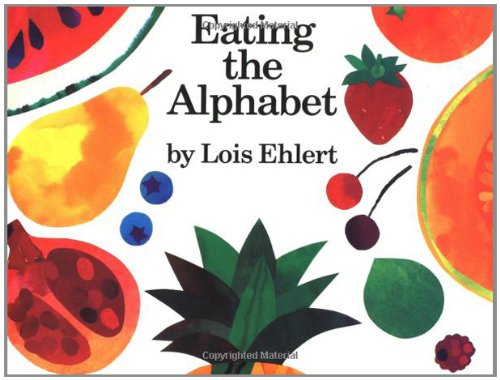
Eating the Alphabet
Lois Ehlert

Ehlert's collage-style art artwork is always colorful and cheerful.  This book is no exception.  It's a beautiful array of alphabet-inspired healthy eating!  My kids always enjoy picking their favorite fruits and veggies on each page.


from Eating the Alphabet, Lois Ehlert


(5)

Brian Wildsmith's Amazing Animal Alphabet

Wildsmith is another of my favorite illustrators.  He's one of those author/illustrators that makes the point that a book for children can have real art - and doesn't have to be cartoon-y - to hold the interest of little ones.  Some of his most beautiful illustrations are those in which he fills a page with birds and various animals.  In this book, it's just one animal per page, but it's lovely nonetheless.


from Brain Wildsmith's Amazing Animal Alphabet


(6)

Alphablock, Christopher Franceshelli and Peskimo

This is a fun book!  The artwork is bright and fresh, sort of retro, sort of modern...  (I don't even really know what I'm talking about ;)  )  Each letter is a cut-out and when the page is turned, all is revealed...


(7)


Ed Emberley's ABC 

Emberley's illustrations are fun and quirky.  On each page, an animal representative of the letter, creates the letter in four steps.  For example, Pirate Parrots Paint the letter P (while Puffins and Parakeets watch.)  The only thing I don't like/get about this book is that "LioN" is for "N."  Weird.  Maybe "narwhals" and "newts" weren't very popular back in 1978 (original publication year) ????  


(8)


Almost An Animal Alphabet, Katie Viggers

I confess, I have not seen this book in person, but we have borrowed Viggers' companion counting book (1 to 20, Animals Aplenty) from the library and it was great!  Her illustrations are sweet and unique.  Her sense of humor is creative and unexpected.  I imagine the alphabet book is just as charming.  I hope our library gets it soon :)


(9)


ABC is for Circus, Patrick Hruby

Another library find for us.  I often stay away from themed ABC books, because it's always such a stretch to find alphabet words to suit a narrow theme or concept.  The circus theme in this book works though!  The illustrations are eye-catching - lots of bold colors set off by black and white.  And really, where else are you going to find "C stands for calliope" or "D is for daredevil" ?!?


(10)


 Charley Harper ABCs

Classic Charlie Harper - minimalist, beautiful lines, angles, colors, and shapes.  His art intrigues me because it seems so simple and realistic at the same time.  I always enjoy looking at his illustrations, maybe even more than my kids :)  


What ABC books do you and your kiddos enjoy??

Interested in my rec's for the best ABC apps out there??
Coincidentally, I've written about that too ;)


The 10 *Best* Alphabet Apps for Toddlers


Tuesday, September 23, 2014

Adding a Little Extra Tech to Our Homeschool (Don't Judge Me...)

Three years ago when we started homeschooling, I would have balked at the idea of employing electronic devices to teach my children.  I had done my reading and planning and we were going to "do school" with hands-on activities, real world experiences, and "living books" (which we would read while sitting next to a babbling brook and eating freshly picked wild fruit, of course.)

Things are a little different now, the most obvious of which is I have two more children than I did when I first dreamed up my dreams, and we've taken a little more "classical" approach to school.  It turns out, my perfect blend of Charlotte Mason/unschool-ish/unit studies doesn't actually work for us.  We still do those nature-y/hands-on/real world things as often as possible (which is fairly often, thankfully)  but they are not the backbone of our homeschool.  They are more like the happy side effect of short lessons (which IS a backbone of our homeschool) and the freedom to set our own pace and schedule.  

A couple years ago, my mom introduced us to the world of the iPad.  I was skeptical at first, but we quickly put it to good use and continue to use them, almost exclusively for school and audio books, daily.  This year I've been even more intentional about including  gadgets and screen time as part of the curriculum.  I really need "help" covering all my bases during lessons time, so I'm not above using technology as a servant.  The kids like it for the variety and I like it because it helps keep the learning humming along even when I'm not sitting next to a child in a one-on-one lesson.   (You don't have to link to any "screen time" articles in the comments, I've already read them and am aware that my children are more likely to be over-tired, obese, violent delinquents with every on-line Latin drill they complete.   I have been informed and have signed the waiver...   Man, can you believe they let people like me have kids???)    

So here's what we've been "using" so far.  Nothing earth shattering, but all very, very helpful to us :)  

Number (1) Most helpful: A new thing I call AUDIO LESSONS.  I put that in caps to emphasize how fabulous this has been so far this year.  It's part of my new homeschool philosophy: "go audio whenever you can."  My mom, who's good at this kind of stuff (thanks mom!) helped me get our curriculum cd's onto our hard drive.  I use Windows Media Center to create new playlists for the boys about once a week.  "Audio Lessons"  is part of their daily schedule.  It's an actual academic "requirement," not fun time at the computer.  


When it's on their schedule they have to listen to their playlist at least once, then review the material with me. They use a headset so that it doesn't disrupt the other lessons going on.  It's really been a game-changer around here because in the past, if I was working closely with one boy, the other one would often just wander around being distracting.  Now, he's engaged in his "audio lessons."  Dominic in particular learns songs and chants very easily and I believe this is going to be very beneficial to him; already he's learned more than I think he would have if I was just giving him plain old instruction.

Here's an example of Dominic's audio lessons playlist this week:

from the Math U See skip counting/addition facts CD:
     Skip Counting by 2's (both versions)
     Skip Counting by 5's (both versions)
     Addition Facts +8's
     Addition Facts +9's
from Song School Latin (books 1 and 2)
     vocabulary songs from Chapters 3 and 5 (book 1)
     present tense verb endings song (book 2)
     present tense conjugation of esse song (book 2)
     1st declension noun endings chant (book 2)
from First Language Lessons for the Well-Trained Mind: Audio Companion for Levels 1 & 2:
     "The Goops,"  poem by Gelett Burgess
     pronouns chant
     state of being verbs chant
     state of being verbs song


So that's what Dominic's got right now.  Aaron is only listening to skip counting by 3, 4, 6, 7, 8, and 9 at this point in anticipation of starting multiplication around the end of the second quarter.  The lessons change every week - I take off old tracks and put on new ones to include new vocab, math facts, grammar rules, etc...  We'll also use it for poetry memorization as well as some science and geography memorization as well.  


(2) Good ole Old-Fashioned Kindle (I say old fashioned because I recently heard that they are only going to manufacture touch screens from this point on and I really recommend the old ones that are button-operated and aren't connected to the Web.)  

I'm so excited about this, I have to shout it from the mountain tops:  AARON HAS BEEN INDEPENDENTLY READING AND ENJOYING HIS FIRST BOOK!!!!!   I'm talking about the first book that he's reading on his own initiative!!  (but then I chat with him about it to assess/confirm comprehension and call it a lesson.)  Anyway, he's reading  The Boxcar Children on the old fashioned Kindle.  He likes it because it's "cool" and he can hardly believe that I'm letting him do it.  And I like it because he can't accidentally swipe the pages around and get lost or confused and he can't get on-line and ruin his childhood with scary on-line things.  I chose to let him use the Kindle in the first place because when your non-reader hints that he's interested in reading something, you make it happen immediately for $3.21 instead of waiting a few days for a library request to come through...  


Now that I've allowed my first book for kids on the Kindle, I'm wondering if i should consider the Amazon Kindle Unlimited subscription (and just make it official that screens are taking over my children's lives...)  Does anyone know if the Unlimited library has a decent selection of easy reading kids books?

3) Headventure Latin vocabulary drills (coincides with Latin for Children from Classical Academic Press)  So far, this has been hugely helpful to us.  Aaron and I review his vocab together a few times, then he sits down at the computer and does a couple rounds of Latin to English and then vice versa, reporting to me on his scores each time.  Once he gets enough A's, he's done for the day.   (Aaron's in Level B now, and what's available on-line is very limited.  It looks like they'll be adding to each level though.  Level A seems to have many more "fun" activities.)  


(4)  Math U See website drills.   The boys use these occasionally, but I have to admit, they're pretty lame.  I really like the MUS curriculum (and the lessons themselves are on DVD, so that's a bonus to me!)  but what they really need is an iPad/android app that allows students to play math games using the MUS method and order of instruction.  For now, the on-line drills will have to do...  (We also use their on-line worksheet generator a lot.)

(5)  Stuff you already know about - Netflix and Amazon Prime.  But maybe you didn't know how many educational programs are "free" (with membership) on-line.  For example, they have tons of NOVA on Amazon Prime :)  Also, now with Amazon Prime's new free music, you can basically decide in the morning which new classical composer you want to study and then start listening right away!  

(6)  And of course, we're still using the iPads.  I've found a few new-to-me apps that I can recommend: (don't forget, I usually get all these apps for free with the notifications from Smart Apps for Kids)  

Marble Math Jr.  - the boys really enjoy this game that combines math practice with a marble maze.  

Art Authority K-12 - this is going to be a wonderful for our art appreciation this year!  You can view the "gallery" either by artist, or by era/style.  The collection of artwork is very extensive but was assembled with young people in mind, so no nudes :)   I like this app so much I may end up writing about it more when we study our first artist this quarter.  It's worth checking out if you do art study at home and would appreciate having a veritable museum at your fingertips!

Handwriting Without Tears Wet, Dry, Try - if you use HWT curriculum I highly recommend this app.  Because HWT uses non traditional paper and method-specific strokes, etc... my kids often get frustrated when writing or tracing letters in other apps.  They're usually done differently than they had been taught.  It's nice to have an app that reinforces the method they use during lessons.  I also like being able to leave behind the dusty chalk, rags, and slates for the less-dusty iPad :)  

(7) Finally, as I mentioned before, I'm replying heavily on anything else that I can get an "audio" version of.  It's not my ideal situation, but I just don't have the time to read everything that needs to be read out loud.   So, books on CD or Audible?  Yes.  Among other things, we're using Story of the World, Volume 1: Ancient Times Audiobook CD  (Susan Wise Bauer), D'Aulaires' Book of Greek Myths from Audible (the list of narrators on this production is impressive!!  Paul Newman, Matthew Broderick, Sidney Poitier!)  and Tales From the Odyssey CD Collection  (Mary Pope Osborne).  It's really been a blessing to be able to "do history" while driving in the car.  Both the kids and I are really captivated by it!  I could never read each chapter two or three times, but in the car it's totally reasonable to replay a couple tracks and by the time we get where we're going we all know quite a bit more about ___fill in the blank with your favorite topic using your best dramatic Jim Weiss imitation___.  


*   *   *   *   *   *

Tech time can never replace real books, activities, and time spent learning through human interaction, but as I have more and more on my plate each year, I'm open to new ideas for making home learning fun and sometimes more feasible.  What ways do you use gadgets, screens, and technology to aid (but not invade!) your homeschool?  


*   *   *   *   *   *

You might also like to check out...


Thoughtful Apps for Thoughtful Pre-Schoolers

Wednesday, May 21, 2014

The 10 *Best* Alphabet Apps for Toddlers


And by *best* I mean my totally subjective list of what's awesome.

Because let's face it, "best of" lists found on a blog like this are reflective only of my classy opinions and inspired whims!   At best.  

But really, I've poked around in a lot of alphabet apps, and I've tested them on my toddler, and these are the best :)

A few words about how I chose:

~ Graphics count.  I like charming and artsy, quirky and creative.  

~ Sounds count.  I can't stand apps that sound like a carnival midway.  Raucous sound effects don't make the cut.  Cute music and minimal sound effects?  Good.

~ The apps I'm recommending are truly for toddlers (1-3 year olds, in my book)  They are simple, easy to navigate, and are (for the most part) just ABC's (flashcard-style) (So, no tracing letters, matching capitals to lower case, find the missing letter, etc..  That's more preschool stuff.)

~ I've included the prices for each app, but note that I got many of them for free with email notifications of "sales" from smartappsforkids.com  Sign up.  It's free. 

~ Finally, you will notice that this list reflects a trend which I neither support nor understand, but it's out there and it cannot be avoided: nearly all alphabet teaching tools for kids are about animals.  WHY IS THIS??????  It drives. me. nuts.  If you are an app developer and you are making a charming, artsy, quirky, creative alphabet app that is not about animals, I love you. Could you hurry up and finish it, though?  I need to give it to my kids before they outgrow their impressionable young years lest they leave childhood with the impression that the only "Q" word worth knowing is quail.

The *Best* Alphabet Apps for Toddlers

(And don't forget to scroll all the way to the end for the absolute best ABC teaching tool yet!)

1. Mini U: Zoo Alphabet, PopArt Factory
$2.99
My very, very, very favorite ABC app of all!  The retro-style graphics are gorgeous - a real delight for the eyes!  The app's settings allow you to choose whether you'd like the narrator to say the letter name or sound. (bonus!)  She also speaks the animal name, and then you may tap for a simple animation.  Much to my pleasant surprise, some of the animals are different when you go through the alphabet a second and third time!  For instance, when viewing the letter "O" you may see "owl" or "octopus," or "orangutan"!!  If you only have $3 to spend on an alphabet app, spend it on this one.
*this app references quails

2. An Animal Alphabet, Jason Walters
free

Beautiful artwork.  For each letter you can tap to hear the letter name, a delightful sound effect (for instance, you hear the seashore on the "Crab" page), and the "sentence" that accompanies the graphic.  No animation.
* references quails

3. Funimal Phonics,  School of Happy
$.99

Basic letters, sounds, animals flashcards.  Somewhat quirky graphics!  Minimal animation.
* references quails

4. The Lonely Beast ABC, James Kelleher
$2.99

So simple, yet so fun.  Quirky :)  Have fun playing the drums on the "D" page!  
* makes no mention of quails

5. The Animal Alphabet, Fish the Mouse Media
$.99

The artwork in this app looks like expensive ABC wall cards you'd see in a pricey catalog nursery!  It's lovely.  Has the look of an old-time traveling carnival show, delightfully onomatopoeic and alliterative narration, simple animations, and "easy" games to play on each screen.  
* references quails

6. Starfall ABC's, Starfall Education
$2.99

All the great stuff you're already familiar with from the ABC portion of Starfall's on-line offerings.  Worth the money (I think) to have the info available to my toddler who can use a touch screen but not a mouse pad.

7. Interactive Alphabet, Piikea St.
$3.99

Lots more here than just ABC flashcards.  You can set this app to "baby mode" and just get the flashcards with some simple animations, or you can play through the more interactive version.  Also has setting for older kids to practice tracing letters and typing words using a QWERTY keyboard.
* no quails were harmed in the making of this app

8. Talking ABC,  Jutiful
$2.99

Claymation!!  Tap the letters to see them morph into... an animal (Except the "Yeti."  What's that all about?) I have to admit, even though it's more animals, they are cute.  And did I mention  claymation?!?   In addition to the alphabet flashcard setting, there are also a few moderately fun activities/games to play (and an alphabet song that I won't mind if I don't hear ever again.)  
* and then God said, "Let there be quails."

9. Animal Alphabet, Happy Kids/Yabra
$1.99 

Again, so simple, but my two-year old and I both love it.  Sweet music, animals wearing amusing costumes, silly animations.  
* quails...

10. Animal Alphabet Book, Anna and Ava, LLC
$.99

Sweet illustrations.  No animation or music.  Three different voices to choose from, and three different settings: "A is for...", "Alligator starts with A," or "A".
* and more quails.

*   *   *   *   *   *

What are your favorite apps for toddler learning time?

*   *   *   *   *   *

Clearly, I'm a fan of iPad learning.  

But you want to know the all-time best ABC teaching tool ever??  Good old fashioned time curled up in a parent's lap.  Learning.  Loving.  Cuddling.  No app can replace that. 


*   *   *   *   *   *

I have tried my best to alert you to all apps in which you will encounter quails.  If quails are against your religion, you have been forewarned... and good luck teaching your kid the alphabet without that word in your vocabulary.  It appears it can't be done ;)
Related Posts Plugin for WordPress, Blogger...